
How to register your restaurant POS with FBR in Pakistan
A step-by-step walkthrough of getting your restaurant registered with FBR, getting your POS ID and token, and printing a verifiable invoice — written for owners, not accountants.
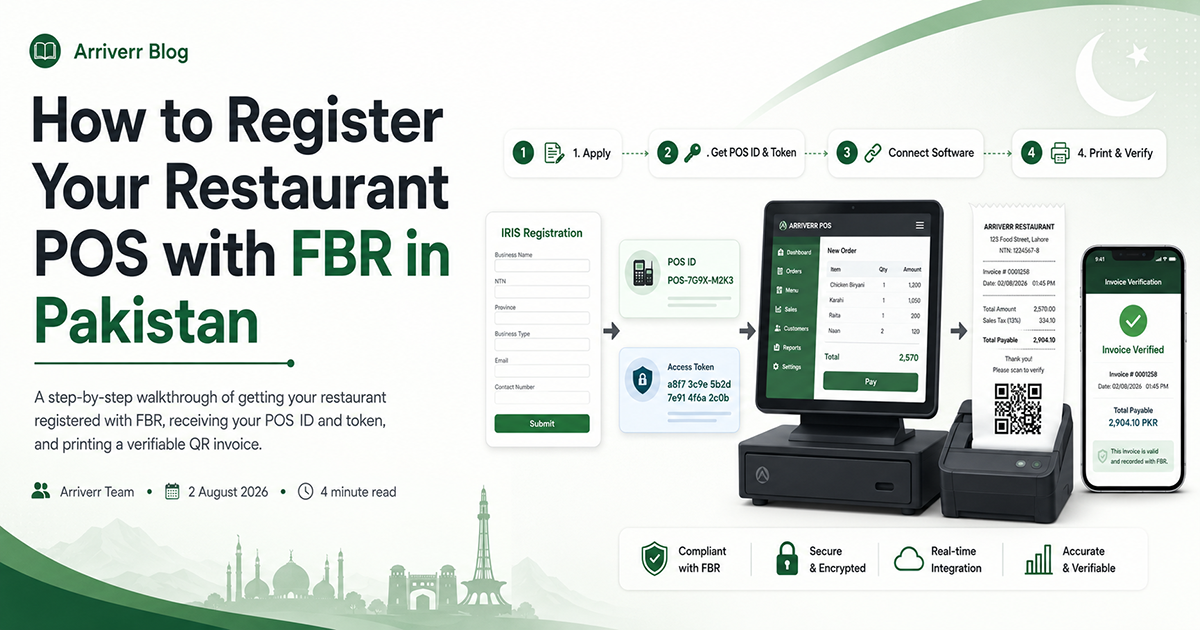
The short answer: register with FBR for POS integration, receive your POS ID and access token, enter both in your software's tax settings, and every sale from that point is filed automatically with a QR code printed on the customer's receipt. The whole thing takes a few working days, most of which is waiting.
What follows is the long answer, written for a restaurant owner rather than for an accountant.
What FBR actually requires
The Federal Board of Revenue requires restaurants above a certain size to report each sale electronically as it happens. Not a monthly summary — each individual invoice, at the moment it is rung up. In return FBR issues a fiscal invoice number, and that number has to be printed on the customer's receipt as a QR code they can scan and verify in the Tax Asaan app.
The point of the QR code is the customer. It lets a diner check that the tax they just paid was actually reported. That is the whole design.
Before you start
You will need three things already in place:
- An NTN — your National Tax Number, in the restaurant's registered name.
- Sales tax registration, active and not suspended.
- An IRIS account you can sign in to.
If any of those is missing, sort it out first. POS registration cannot proceed without them, and chasing it in parallel wastes a fortnight.
Step 1 — Apply for POS integration
Sign in to IRIS and find the POS registration form. You will be asked for the branch address, the number of terminals at that branch, and the software you intend to use. Each physical location is registered separately — a restaurant with three branches ends up with three POS IDs.
Step 2 — Receive your POS ID and token
Once approved, FBR issues a POS ID (a number identifying that terminal) and an access token (a long string that authenticates your submissions). Treat the token like a password. Anyone with it can file invoices in your name.
Step 3 — Connect your software
In POS Beast this is Settings → Tax Integration → FBR. Switch it on, paste the POS ID and token, and set your default PCT code. Save.
Ring up a test sale. Within a second or two the order should show an FBR invoice number, and the printed receipt should carry a QR code. Scan it with Tax Asaan. If it verifies, you are done.
Step 4 — Check the receipt
A compliant receipt shows your NTN, the invoice number FBR returned, the tax charged, and the QR code. Print one and look at it properly on the actual thermal printer — a QR code that is too small or too faint to scan is a compliant invoice that fails in a customer's hands.
What goes wrong, and why
"Failed — FBR returned HTTP 200"
This one confused a lot of restaurants. It means the submission reached FBR but not the POS gateway — the sale was posted to the wrong endpoint. Sales must go to FBR's POS (IMS) gateway in the official invoice format, not to the general e-filing endpoint.
The invoice is rejected with a PCT code error
Every item needs a PCT (Pakistan Customs Tariff) code. Prepared food has its own. Set a sensible default in your tax settings so a new dish is never filed without one.
The tax rate does not match
The rate you charge must match your registration. Punjab restaurants often charge a lower rate on card payments than on cash, which is legitimate — but both rates have to be set up correctly in the software, per payment method.
What about Punjab?
Restaurants in Punjab may also fall under the Punjab Revenue Authority. PRA filing works the same way and is configured on the same screen, and a restaurant can be registered with both.
Do it before you are told to
The restaurants that struggle with this are the ones who start after receiving a notice, with a deadline and a penalty already running. Registering while nothing is urgent means the inevitable back-and-forth over a tariff code costs you a week rather than a fine.
Try it on your own restaurant
Everything described here is in the software. A 7-day trial opens immediately, with no card.