
Kitchen display or printed tickets?
A screen at the pass is not automatically better than paper. Here is what each is genuinely good at, and how to decide which suits the kitchen you actually have.
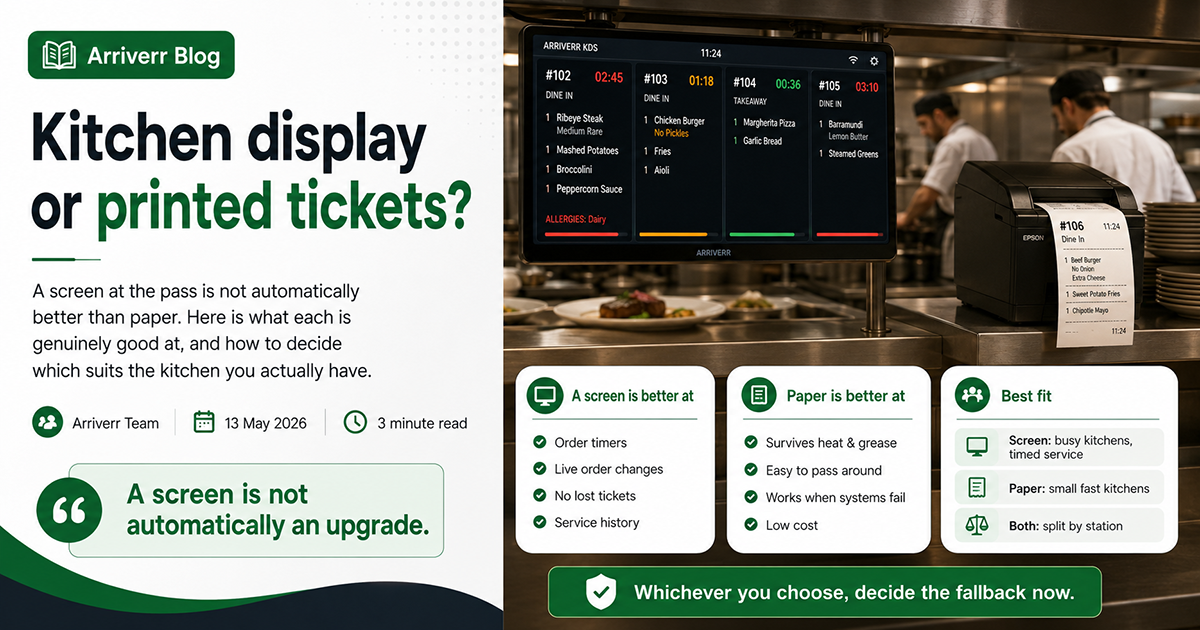
A screen is not automatically an upgrade. It is better at some things and worse at others, and which matters depends on the kitchen you have rather than on the year.
What a screen is genuinely better at
Knowing how long something has been waiting
This is the real argument, and it is a strong one. Every ticket carries a timer. The one running late is visible before a guest asks about it, which is the difference between a recovery and a complaint.
Paper cannot do this. A docket that has been up for nineteen minutes looks exactly like one that went up two minutes ago.
Changes to a live order
A guest changes their mind. On a screen the ticket updates. On paper somebody has to find the docket, cross something out, and hope the person cooking sees it.
Paper that goes missing
Dockets fall behind equipment, stick together, get thrown out with packaging. Every kitchen has lost an order this way. A screen cannot lose one.
Knowing what actually happened
Ticket times, per station, over a service. Which dishes are slow. Which night the kitchen fell behind and when. Paper leaves no record at all.
What paper is genuinely better at
Surviving a kitchen
Heat, steam and grease are hard on screens. A printer can sit somewhere a screen cannot, and a greasy thumb on paper costs nothing.
Being in two places
A docket can travel with the plate. It can be handed to somebody. A screen is where it is mounted.
Working when things fail
A printer with paper in it prints. A screen needs power, a network and a device that has not crashed. Kitchens have opinions about this for good reasons.
Costing almost nothing
A thermal printer is a fraction of the cost of a screen and its mount, and you probably need one anyway for customer receipts.
How to decide
A screen suits you if: you do more than about eighty covers a service, your tickets have several stages, you have somewhere clean and dry to mount it, and somebody actually looks at ticket times.
Paper suits you if: you are a small kitchen where the cook can see the pass, your menu is simple and fast, the kitchen is cramped and hot, or the counter PC is already the only screen in the building.
Both suits you if you have distinct stations. A screen at the pass for whoever is coordinating, printers at grill and cold larder so each station has paper in front of it. This is what most busy kitchens end up doing.
Splitting by station
However you display them, split the ticket properly. Grill items on the grill's ticket, cold items on the cold larder's — not one slip per category, which produces six pieces of paper for one order, and not the whole order at every station.
The same applies inside a deal or a combo: each item should print where it is cooked, under the deal's name so the pass can put it back together.
Whichever you choose, decide the fallback now
Write down what the kitchen does when the screen fails or the printer jams, and put it where they can find it. Service is not the moment to invent a plan.
Try it on your own restaurant
Everything described here is in the software. A 7-day trial opens immediately, with no card.