
What happens to your till when the internet goes down
Load-shedding, a cut fibre, a router that needs restarting. Whether your restaurant keeps selling through it is a question worth asking before you choose software, not during service.
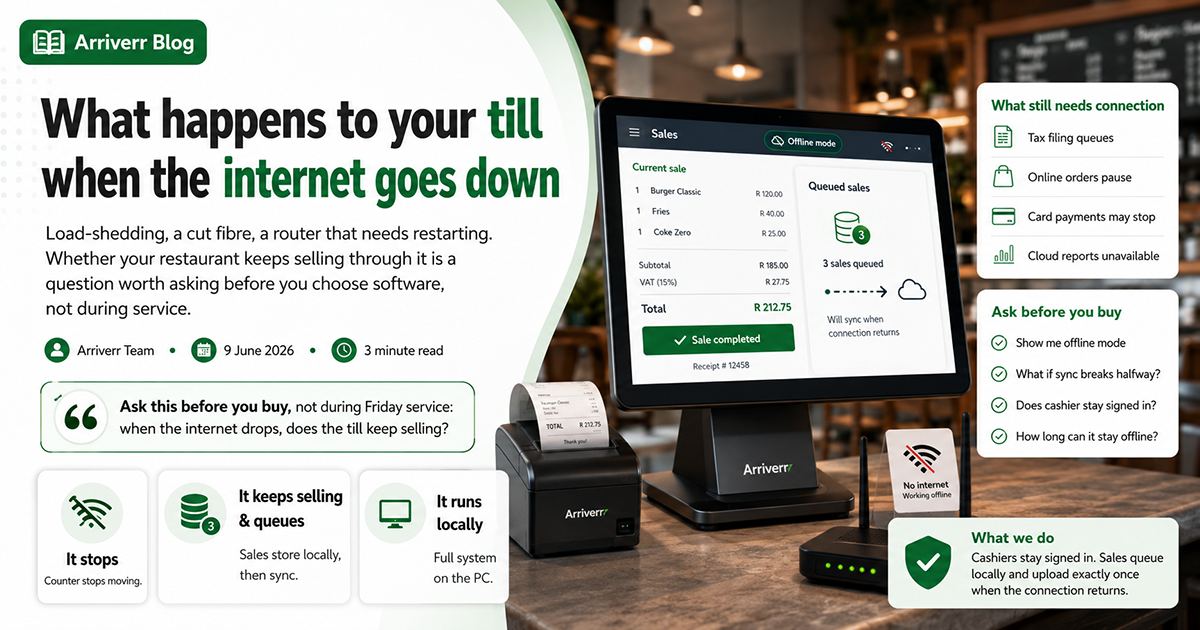
Ask this before you buy, not during Friday service: when the internet drops, does the till keep selling? For a restaurant in Pakistan or much of the Gulf this is not a hypothetical — it is a Tuesday.
Three ways software handles it, and what each means
It stops
The screen shows a connection error and the queue at the counter stops moving. Some cloud systems really do this. It is the reason a lot of restaurants keep a receipt book under the counter — and a paper fallback means an evening of typing afterwards, with the mistakes that come with it.
It keeps selling and queues
The till carries on. Completed sales are stored on the device. When the connection returns they upload. This is what good cloud software does, and it is enough for most restaurants.
The detail that matters: each sale needs its own identifier, generated on the device. Without it, a sync that is interrupted halfway can upload the same order twice — and a duplicated sale in your accounts is worse than a missing one, because you will not notice it.
It runs locally
The whole system is installed on the counter PC. No internet involved in anything, including reports and stock. This is the most robust option and the least convenient one: updates are manual, and running several branches means several installations to keep in step.
What still needs a connection
Even with a good offline queue, some things genuinely cannot work while the line is down:
- Tax filing. FBR and ZATCA submissions queue and go when the connection returns — which is compliant, since both allow reporting within a window.
- Online orders. They are coming over the internet; if it is down, they are not arriving.
- Card payments, if your terminal is network-based.
- Reports, on a cloud system.
None of those stop you serving food and taking cash, which is the thing that must not stop.
The questions to ask, and how to check the answers
- "Show me." Ask the salesperson to turn off the wifi on their demo machine and ring up a sale. This one question separates the answers from the claims.
- "What happens if the sync is interrupted halfway?" You want to hear about per-sale identifiers, not "it retries".
- "Does the cashier get signed out?" A session that expires offline means the till is locked in the middle of service.
- "How long can it stay offline?" Hours should be fine. If the answer is minutes, it is a retry, not an offline mode.
- "What does the cashier see?" Staff need to know it is queuing, not broken — otherwise somebody will start writing on paper "to be safe" and you get both.
What we do
Cashiers stay signed in on the till device and completed sales queue locally, then upload exactly once when the connection returns. For counters where the line goes down often or for long stretches, there is a Windows build that runs the entire system on the PC with no internet at all.
But do not take that on trust — ask us to show you, the same way you should ask anyone else.
Try it on your own restaurant
Everything described here is in the software. A 7-day trial opens immediately, with no card.